# Is this model file what it says it is?
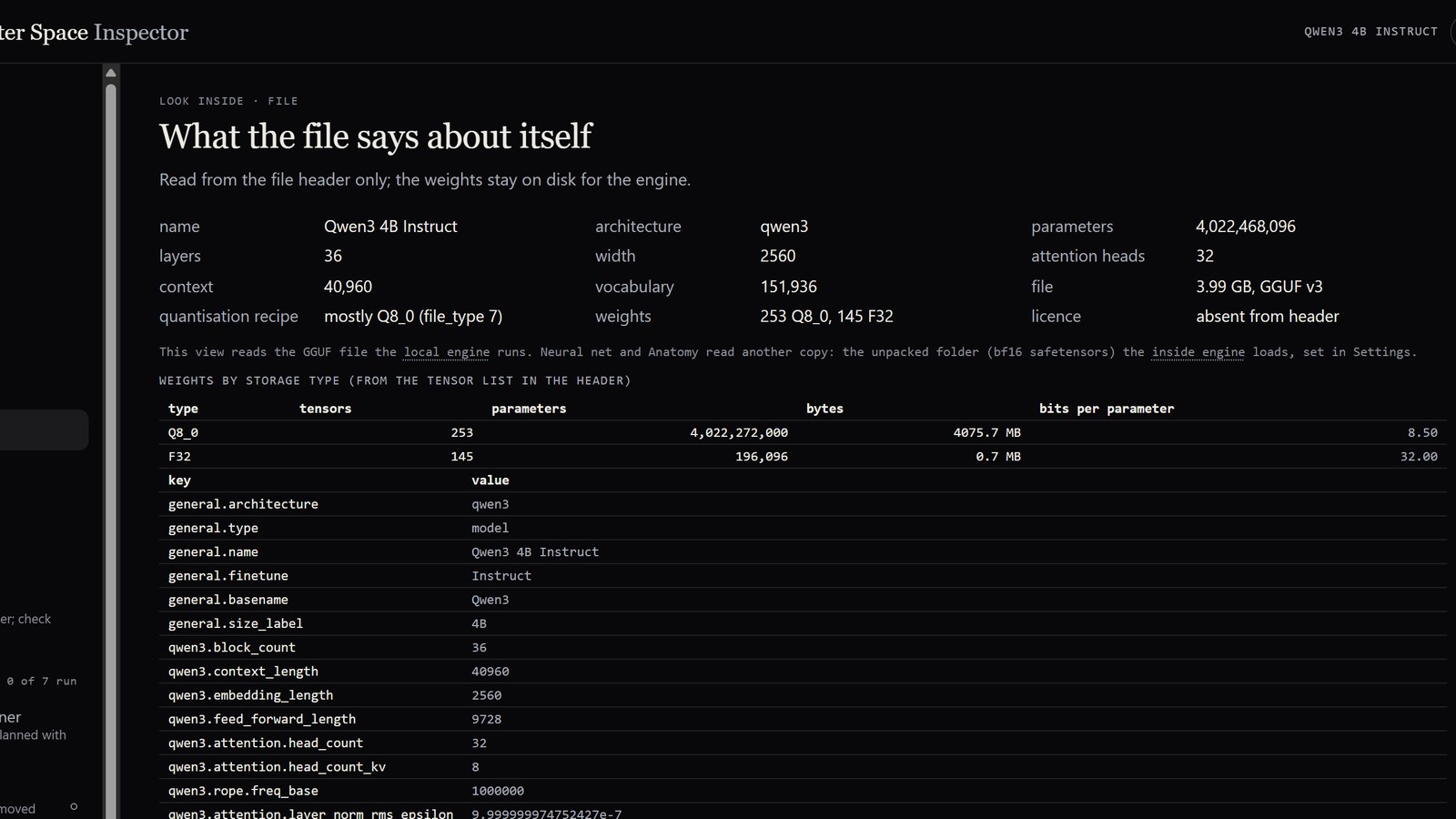
File reads a GGUF header without running the model: Qwen3-4B, 4,022,468,096 parameters, 36 layers, mostly 8-bit. One surprise: the file doesn't carry its own licence.
Canonical: https://parameterspaceinspector.com/blog/is-this-model-file-what-it-says/
Updated: 2026-10-25
Part of the Parameter Space Inspector (free, open-source desktop app) · section: https://parameterspaceinspector.com/blog/ · Site guide for AI: https://parameterspaceinspector.com/llms.txt
**In short.** What a file claims to be, checked in seconds and without running it. Qwen3-4B is Apache-2.0, but this file can't tell you so.
**Who this is for.** Anyone who downloads models from a hub, and organisations with a "no unknown binaries" policy. You do not need to know how models work: the background section explains every field.
**The test.** *confirmed* (a problem) if the header disagrees with the model card (architecture, size, tokenizer,
quantisation); *dissolved* if it matches the publisher's original and, where signed, the lineage verifies. The control: the official file from the original publisher, header beside header.
## Background: four ideas you need
### 1. A model file, and its header
A language model is a very large list of numbers called its *weights*: about 4 billion of them for Qwen3-4B. The file you download to run a model on your own computer is usually a [GGUF](/glossary/gguf/) file: a *header* that describes the model, followed by the weights. The header is the file's label. It says what the model is, how it is built, how its numbers are stored, and the dictionary of pieces it reads with. PSI's [File](/instruments/file/) view reads that header without loading the weights, so nothing is run on any text.
A label can be wrong, by mistake or on purpose. Checking it means comparing it with what the publisher says (the model card) and with the publisher's own file.
### 2. What the header fields mean
| Field | In plain words |
|---|---|
| name | what the maker called the model |
| architecture | the family of design, for example qwen3 or llama |
| parameters | how many weights it has |
| layers | how many processing steps are stacked between reading a piece and guessing the next |
| width | how many numbers stand for each piece inside each layer |
| heads | how many parallel look-ups each layer makes over the text before it |
| context | the most text, in pieces, the model was trained to hold at once |
| vocabulary | how many [tokens](/glossary/token/) (pieces of text) its dictionary holds |
| quantisation recipe | the main way its weights are stored (see below) |
| licence | the licence, if the maker wrote one into the file |
A value the header does not carry is shown as **absent from header**, never as "?" or 0.
### 3. How the weights are stored
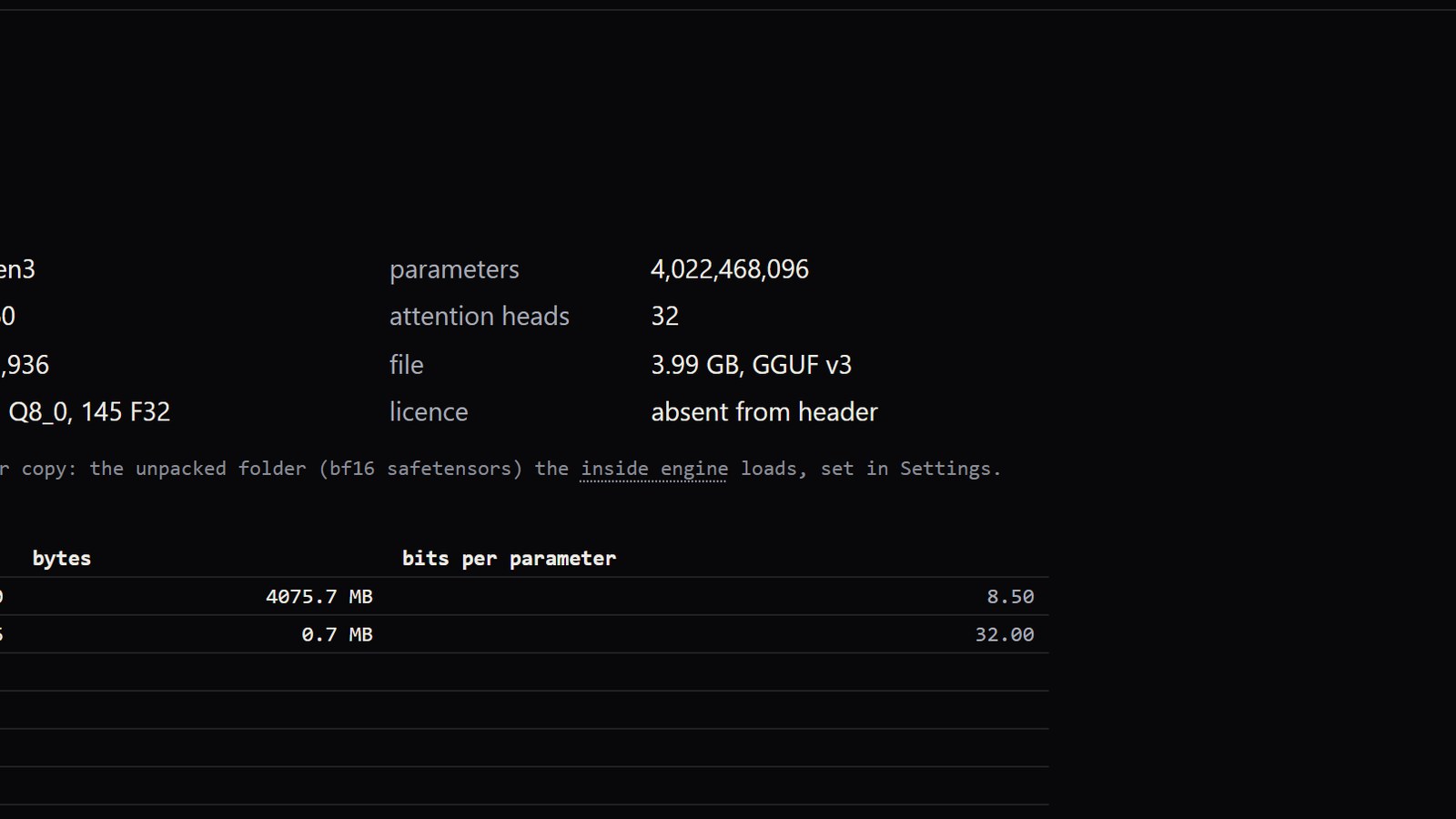
The same model is published in several versions that differ in how precisely each weight is stored. That is *quantisation*: rounding every weight so that it takes fewer bits, for a smaller file. The type is written as a code: F32 is full precision (32 bits); Q8_0 is about 8.5; Q4_K about 4.5. The header's recipe (for example "mostly Q8_0") names only the main type. **Weights by storage type** is the full picture: for each type, how many tensors (blocks of weights) use it, how many parameters, how many bytes and how many bits per parameter.
### 4. Two copies, and a signed family tree
The GGUF file is what the local engine (llama.cpp) runs. PSI's views that look inside the model read a second copy: the unpacked, full-precision folder that the *inside engine* (Python and PyTorch) loads. When both are set, File says whether their layers, width and vocabulary agree.
A model trained in How AI Emerges can also carry a signed [lineage](/glossary/lineage/): a record of its parent, its training data and its settings, signed so that a changed number no longer matches. [Seed & lineage](/instruments/seed-lineage/) checks it.
## What you need
- **PSI installed and running.** See [Install](/docs/install/). File reads the header of the GGUF file you open as the local model in Settings. It does not run the model on any text: no Python and no GPU are needed.
- **The GGUF file you want to check.** We checked a Qwen3-4B file at Q8_0.
- **Something to check it against:** the publisher's official file, or at least its model card (the page on Hugging Face or the maker's site that says what the model is).
- **Optional, for the agreement check:** the inside engine, which needs the model's full-precision weights folder, Python and PyTorch, and a GPU with about 9 GB free (or it runs slowly on the processor).
- **Optional, for signed models:** a model trained in How AI Emerges.
- **Somewhere to write down the fields**, for example a copy of this table:
| Field | Your file | The official file or model card |
|---|---|---|
| architecture | | |
| parameters | | |
| layers · width · heads | | |
| context | | |
| vocabulary | | |
| quantisation recipe | | |
| licence | | |
## Steps
### Step 1. Load the model
1. Open the app, or `http://127.0.0.1:4310` if you run it in the browser.
2. Press the gear button (⚙, *Model settings*) at the top right. This opens Settings.
3. Under **Local model**, pick the .gguf file you want to check from the list and press **Load**. If it is not in the list, press **Scan folder** and choose the folder that holds it, or paste the file's full path and press **Load this file**.
4. Wait until the line under the list says **Loaded** with the file's name. A 4 GB file takes a few seconds to a minute.
### Step 2. Read the header (File view)
1. Open the File view from the menu on the left. (If no model is open, it says so, with a **Choose a model** button that takes you to Settings.)
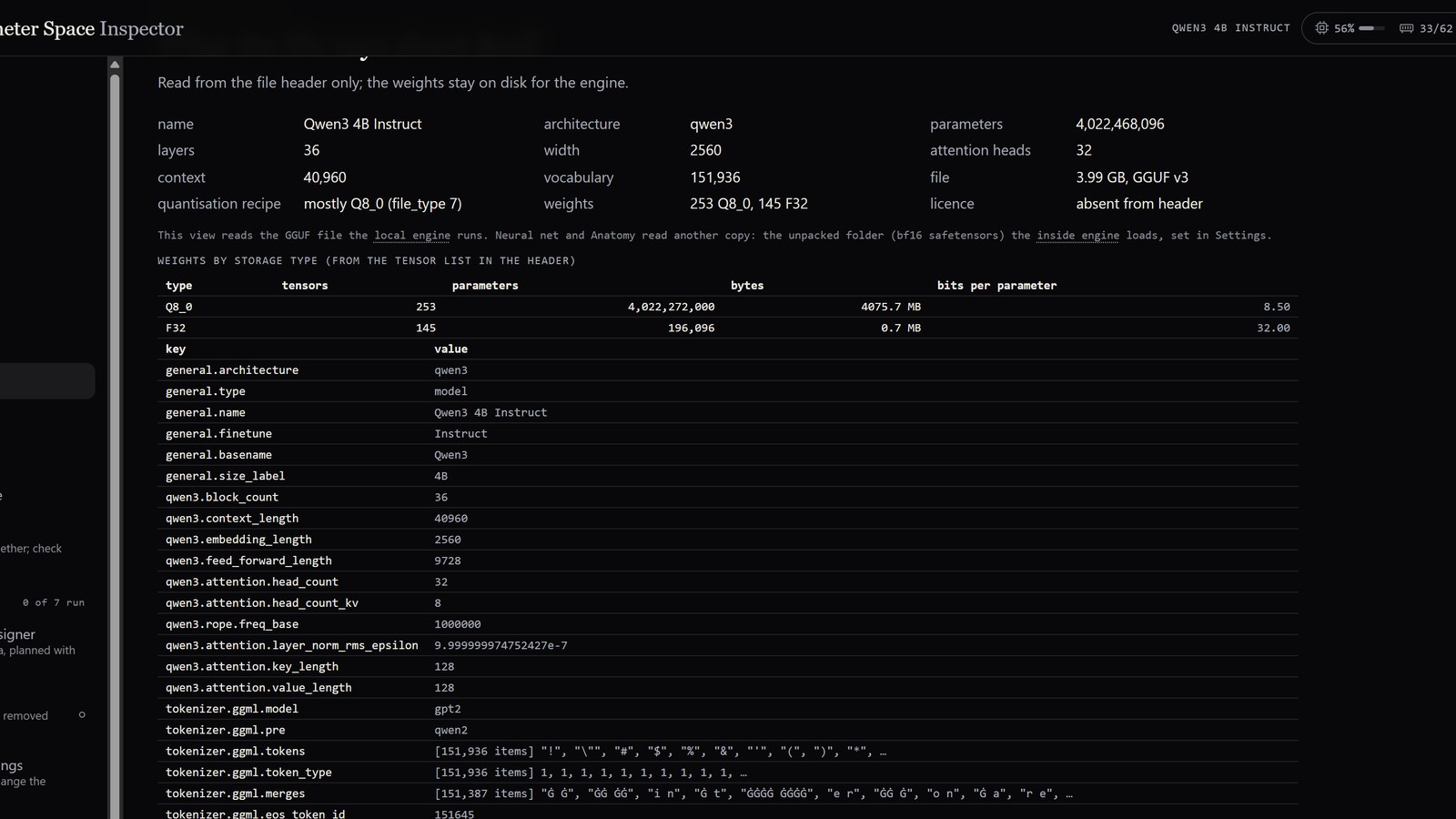
2. Read the facts at the top: name, architecture, parameters, layers, width, heads, context, vocabulary, the quantisation recipe and the licence. Below them, every key in the header is listed with its value.
3. Write them down in your table.
### Step 3. Read the storage table
1. Find **Weights by storage type**.
2. Note each type, its number of tensors and its bits per parameter. In a file sold as "8-bit", most weights should be at about 8.5 bits; a few small tensors are usually kept at full precision.
### Step 4. Compare with the original
1. Put your notes beside the model card, or load the publisher's official file the same way (step 1) and open File again.
2. Compare field by field. A file whose architecture, size, vocabulary or quantisation disagrees with the original is not what it says it is.
### Step 5. Check the unpacked copy (optional, inside engine)
1. In Settings, under **Inside-the-model engine**, leave *follow the local model* on (the default) or choose the weights folder by hand, and press **Save and restart the engine**. **Check the setup** lists anything missing.
2. Back in File, read the note under the facts: it says whether the GGUF and the unpacked copy agree on layers, width and vocabulary.
### Step 6. Check the signature (signed models only)
1. With a model trained in How AI Emerges loaded, open [Seed & lineage](/instruments/seed-lineage/) (in the menu, under Beta).
2. Under **Who this model is**, press **Check it**. It checks the signature and every ancestor. Checking only reads; it changes nothing.
The header: Qwen3 4B, 4,022,468,096 parameters, 36 layers, mostly 8-bit.One line stands out: licence, absent from header. The file doesn't carry its own licence.
## What you will see
If you check a Qwen3-4B file at Q8_0, your header should read like this one. A file at another quantisation will differ in its size and its storage table.
| Field | Header says |
|---|---|
| name | Qwen3 4B Instruct |
| architecture | qwen3 |
| parameters | 4,022,468,096 |
| layers · width · heads | 36 · 2560 · 32 |
| context | 40,960 |
| vocabulary | 151,936 |
| file | 3.99 GB, GGUF v3, mostly Q8_0 (253 Q8_0 tensors, 145 F32) |
| licence | **absent from header** |
| GGUF vs unpacked copy | agree (layers compared) |
**What this settles.** In seconds and without running anything: what the file claims to be. One surprise: the file doesn't carry its own
licence. Qwen3-4B is Apache-2.0, but someone handed this file has no way to know that from the file alone.
The tensor table: 253 tensors stored at 8 bits, 145 at full precision.
## What it will not tell you
What is in the weights. A matching header is necessary, not sufficient: behaviour hidden in the weights would not
show here. Open only files from sources you trust (llama.cpp parses GGUF natively).
## Run it as an agent
PSI's dev server speaks MCP, so an AI assistant can run this test for you. The calls:
```json
{"name": "psi_status", "arguments": {}}
{"name": "seed_lineage", "arguments": {"file": ""}}
```
The full set, with scripts and raw results, is case 05 of the Questioning AI playbook. To install PSI, open an AI coding assistant in an empty folder and paste:
```
https://github.com/EmAssets/parameter-space-inspector
Help me use this
```
## Transcript
The walkthrough has no voice-over; these are its on-screen words, in order.
- Is this model file what it says it is?
- Everything the file says about itself, read from the header without running it.
- The header: Qwen3 4B, 4,022,468,096 parameters, 36 layers, mostly 8-bit.
- One line stands out: licence, absent from header. The file doesn't carry its own licence.
- The tensor table: 253 tensors stored at 8 bits, 145 at full precision.
- What a file claims to be, checked in seconds and without running it.
- Qwen3-4B is Apache-2.0, but this file can't tell you so.
- A clean header is necessary, not sufficient: it says nothing about what is in the weights.
- Try it: https://github.com/EmAssets/parameter-space-inspector · Help me use this
## Questions people ask
### How can I check a downloaded GGUF before running it?
Open it in File: it reads the header (architecture, parameter count, layers, quantisation, tokenizer, metadata) without loading the weights. Compare it with the publisher's original.
### Does a GGUF file include its licence?
It can, as metadata, but this Qwen3-4B file did not: "absent from header". If you received it from someone else, check the original model card.
### Does a matching header prove the file is safe?
No. A clean header is necessary, not sufficient: it says nothing about what is in the weights. Open only files from sources you trust.
### What is a GGUF header, in plain words?
It is the label at the start of a GGUF model file: the model's name, its architecture, how many weights and layers it has, how its weights are stored, the dictionary of pieces it reads with, and any other facts the maker wrote in. It can be read in seconds without running the model, and compared with the publisher's model card.
---
From [The Emergence Machine](https://emergencemachine.com/). Newsletter: [subscribe on Substack](https://theemergencemachine.substack.com/subscribe). Use-case feed: https://parameterspaceinspector.com/feed.xml. Follow: [Substack](https://theemergencemachine.substack.com) · [YouTube](https://www.youtube.com/@emergencemachine) · [X](https://x.com/emergences4me) · [Bluesky](https://bsky.app/profile/emergencemachine.bsky.social) · [Reddit](https://www.reddit.com/r/emergencemachine/) · [Instagram](https://www.instagram.com/emergencemachine/) · [TikTok](https://www.tiktok.com/@emergencemachine) · [Kaggle](https://www.kaggle.com/emergencemachine/datasets).