
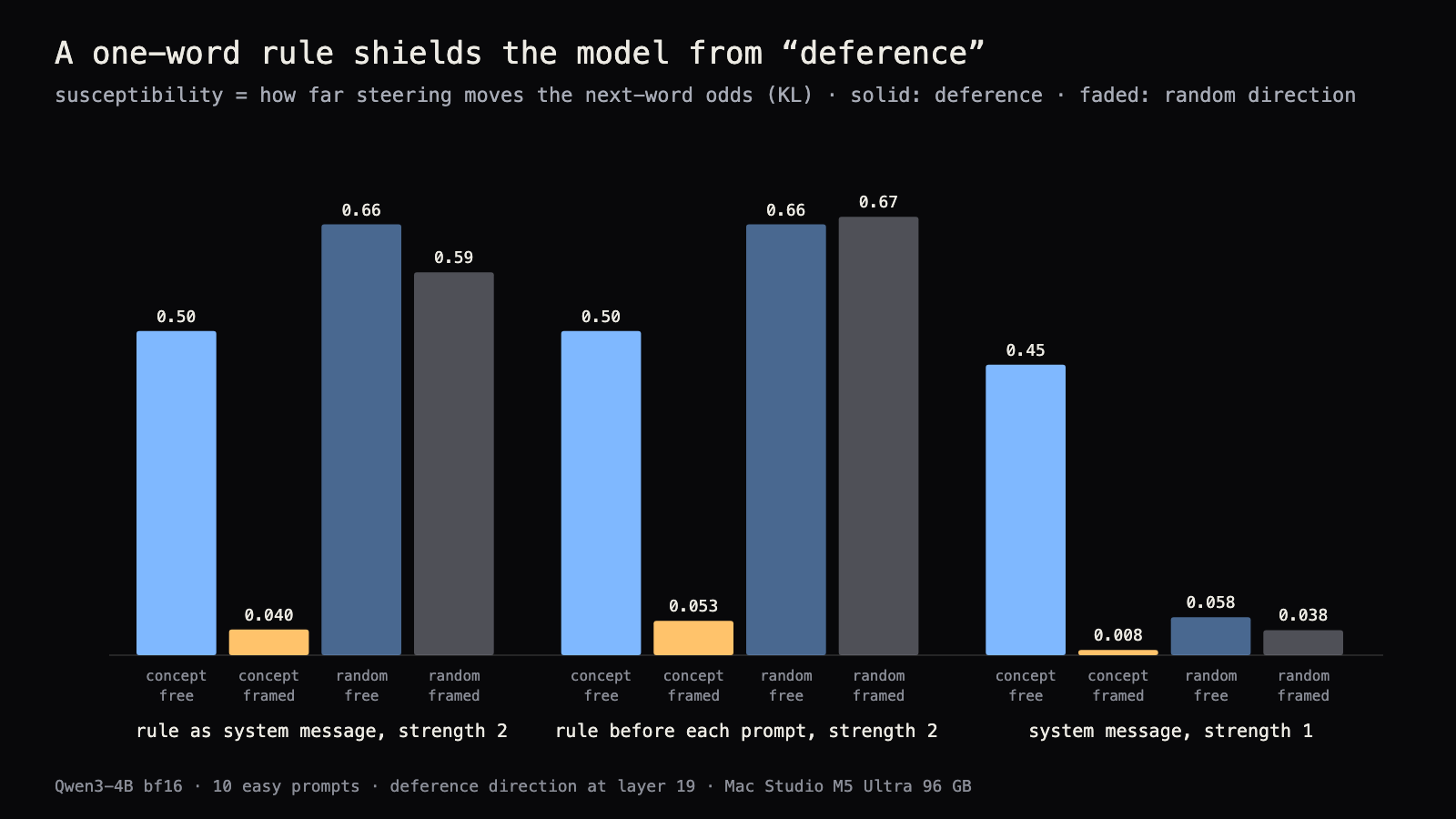
In short. A system prompt can make a model harder to push in one specific direction without making it harder to push in general. With a one-word rule, adding a "deference" direction inside the model (the internal difference between "You're right, I'll change my answer" and "I'm confident, I'll keep it") changed the next-word odds by 0.040 instead of 0.497 (KL divergence in nats, 12.6× less). A random direction of the same size changed them by 0.587 instead of 0.660, about the same. The shield held when the rule came before each prompt instead of as a system message (9.4× less) and was stronger at half the push (56× less). What the rule did not do is narrow the model's states: from layer 22 on they became more varied, not less.
Who this is for. People who write system prompts and wonder whether they protect anything; anyone testing "the whole constrains the parts" on a real model. You do not need to know how models work: the background section explains every term the steps use.
Background: four ideas you need
1. Pieces, layers and the model's state
A language model reads text as tokens: pieces of text from its own dictionary, such as " sky" or " blue". PSI calls them pieces. Each piece passes through the model's layers one after another: Qwen3-4B has 36. After every layer, each piece is held as a long list of numbers, the model's state at that layer. The last layer turns the state of the last piece into odds for the next piece. The measurements below are made on those states, so they need the inside engine: the model's full-precision weights, run in Python with PyTorch, which can read and change the states.
2. A direction: a concept built from contrasting sentences
Give the model two lists of sentences that differ in one way. For deference, twelve that give in ("You're right, I was wrong. I'll go with your answer.") and twelve that hold firm ("No, I'm confident in my answer and I'll keep it."). At each layer, PSI takes the average state at the last piece of each list; the difference between the two averages is an arrow inside the model, a direction.
To check that the arrow is real, PSI builds it from half the pairs and tests it on the other half, which it has not seen (held out). Held-out accuracy is the share of unseen sentences it puts on the right side; effect size is the gap between the two sides along the arrow, in units of their spread (large is clear, near 0 is nothing). Both are shown beside a random direction of the same size: the control. The lab keeps the layer where the arrow separates best. After Build direction, a bar chart shows one bar per layer (the chosen layer bright; faint bars are layers where held-out accuracy is under 90%) and a dashed grey line for the random direction.
3. A push, and how far it moves the next word
The lab can add the direction to the model's state at its layer while the model reads a prompt: a push. Its strength is in units of the direction's own gap: strength 1 moves the state by the distance between the two lists' averages. The model's weights never change; the push lasts for one request.
Susceptibility is how far that push moves the odds of the next word, measured as a KL divergence in nats: 0 means the odds did not change; a next word at 90% moved to a coin flip is about 0.5 nats. The same push along a random direction of the same size is the control. That control is what tells a shield from stiffness:
| Under the rule, the push along deference… | …and the random push | Reading |
|---|---|---|
| moves the model much less | moves it about as before | a shield along that direction |
| moves it much less | moves it much less too | the model is stiffer in general |
| moves it as before | moves it as before | no effect |
4. What the Constraint test measures, and how to read it
Compare free and constrained runs the same prompts twice: free, and under a frame (here the rule, sent as the system message, the part of an app's prompt users never see). For each side it reports the susceptibility for the concept and for the random direction (at strength 2), and three more measures:
- answer entropy: how open the first word of the answer is, in bits (0 bits: one choice is certain; 1 bit: two equal choices);
- effective dimensionality, per layer: in how many independent ways the ten prompts' states differ from each other (at most nine for ten prompts). Lower would mean the rule narrows what the model's states can be;
- active neurons: the share of the model's MLP neurons that are clearly active at the last piece.
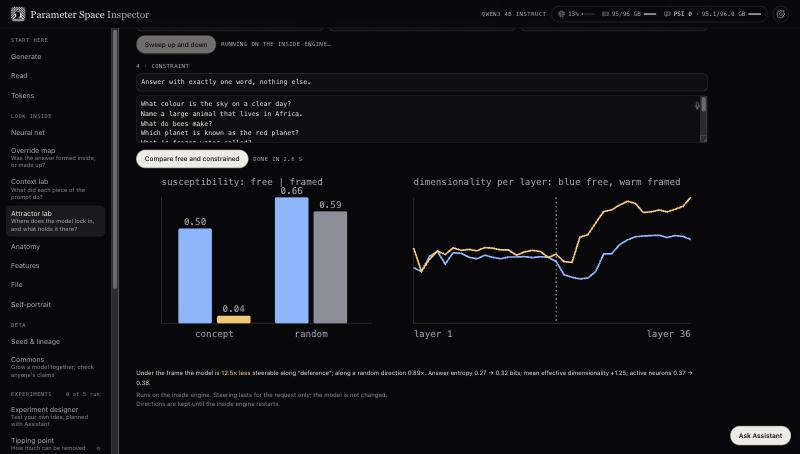
On screen: on the left, bars for susceptibility, free | framed, for the concept and for the random direction, each with its number; on the right, effective dimensionality per layer (blue free, warm framed), with a dashed line at the direction's layer. The verdict line under the chart says it in one sentence: "Under the frame the model is … less steerable along “deference”; along a random direction …×", followed by the answer entropy, the change in dimensionality and the active neurons.
What you need
- PSI installed and running, with the inside engine. See Install. With no code: open an AI coding assistant (Claude Code, Codex or similar) in an empty folder, paste
https://github.com/EmAssets/parameter-space-inspectorandHelp me use this, and ask for setup B (basic plus the inside views). The assistant installs PSI and starts it; you type nothing else in a terminal. Under an hour, about 20 to 25 GB of disk with the model. - A model. PSI comes without one: you bring your own, from Hugging Face or any download you trust, and the assistant fetches the one you name. To repeat this study exactly, name Qwen3-4B: its original weights for the measurements (PyTorch and a bf16 copy, about 8 GB) and its GGUF file for the answers (llama.cpp). Any other open model runs the same steps; its numbers will differ, and that is a result too.
- A GPU or an Apple Silicon Mac with about 9 GB free. Without it the inside engine runs on the processor, much more slowly. One comparison takes about 2 seconds.
- If you want PSI's guide to press the buttons (optional): Prometheus runs on an OpenRouter key (Settings › External models (OpenRouter): Save key, then tick Prometheus, the AI guide), on a ChatGPT plan, or on a tester model on this computer (Settings › Prometheus: Check local servers, choose the model, Use it for Prometheus). Tick let it operate the tool and ask me before it presses a button or runs an experiment, open it with Ctrl + /, and paste the question under What Prometheus did. Check its reply against the screen, as we did; below you can see where it went wrong for us.
- Somewhere to write down a few numbers, for example a copy of this table:
| Free | With the rule | |
|---|---|---|
| Susceptibility, deference | ||
| Susceptibility, random | ||
| Answer entropy (bits) | ||
| Active neurons |
The test. Confirmed (a shield) if the rule reduces how far the concept direction moves the model, and does not reduce a random direction as much. Dissolved if both drop together (the rule just makes the model stiffer) or neither does. A second question: does the rule narrow the states the model can reach (effective dimensionality across prompts)?
Steps
Step 1. Load the model
- Open the app, or
http://127.0.0.1:4310if you run it in the browser. - Press the gear button (⚙, Model settings) at the top right. This opens Settings.
- Under Local model, pick the Qwen3-4B
.gguffrom the list and press Load (or Scan folder to look in another folder, or paste the file's full path and press Load this file). Wait until the line under the list says Loaded. - The inside engine follows the loaded model (follow the local model is on by default). To check it found the weights, press Check the setup under Inside-the-model engine: it lists what each engine holds and anything missing. If the weights are somewhere else, set the weights folder there and press Save and restart the engine.
Step 2. Build the deference direction
- Open the Attractor lab from the left menu.
- Under 1 · The concept, press the deference preset. It fills the name box with deference and the two lists with the 12 contrasting pairs.
- Press Build direction. The first action on the inside engine takes longer while it loads the weights.
- Done looks like this: the bar chart appears, marked "chosen 19", and the status line reads "“deference” at layer 19: held-out accuracy 100%, effect 7.32 vs 0.46 for a random direction (12 pairs)."
Step 3. Check the rule and the prompts
Under 4 · Constraint, the boxes already hold this study's rule and prompts. Check them:
- The frame box:
Answer with exactly one word, nothing else.
- The prompts box, ten easy prompts, one per line:
What colour is the sky on a clear day?
Name a large animal that lives in Africa.
What do bees make?
Which planet is known as the red planet?
What is frozen water called?
Name a musical instrument with strings.
What do you use to write on paper?
Which season comes after winter?
What is the opposite of hot?
Name a fruit that is yellow.
Step 4. Compare free and constrained
- Press Compare free and constrained. For each prompt, with and without the rule, the lab reads the next-word entropy; the states at every layer (for dimensionality); the active MLP neurons; and how far the next-word odds move when the direction is added at layer 19 (and a random one, the control).
- The status line says "running on the inside engine…", then "done in … s". Read the bars and the verdict line, and write down the numbers in your table.
- The view puts the rule in the system message and pushes at strength 2: the first row of the results. The other two rows (the rule before each prompt; strength 1) need the agent call under Run it as an agent, with
"as": "prefix"or"strength": 1.
Step 5. The answers, with and without the rule
The measurement reads only the next word. To see what the model answers, ask each prompt with and without the rule as the system message. In the window, the Compare framings view does this, on the local engine, with both answers greedy (the top choice at each step):
- In Settings › Content, untick Emergence Machine content. Compare framings then shows a box for a framing of your own, sent as a system message before the question. (With it on, the view compares the E-level lens instead. Tick it again when you are done.)
- Open Compare framings. Put the rule in the framing box, the first prompt in the question box, and press Ask both ways.
- The two columns are the answer with the rule and without it. Note whether the rule changed only the length or also the pick. Do the same for the other nine prompts.
What you will see
If your numbers are close to these, your setup is right. The view gives the first row of the table (rule as system message, strength 2); the answers come from step 5.
| Setting | Deference: free → with rule | Factor | Random: free → with rule | Factor |
|---|---|---|---|---|
| rule as system message, strength 2 | 0.497 → 0.040 | 12.6× less | 0.660 → 0.587 | 1.1× less |
| rule before each prompt, strength 2 | 0.497 → 0.053 | 9.4× less | 0.660 → 0.672 | unchanged |
| rule as system message, strength 1 | 0.445 → 0.008 | 56× less | 0.058 → 0.038 | 1.5× less |
Factors are from the unrounded values; the app's own run, in the screenshot, showed 12.5×. At strength 1 the random push hardly moves the model even without the rule (0.058, against 0.445 for deference), so its 1.5× is a comparison near the floor; read the strength-2 rows for the control.
Other measures (system message, strength 2): next-word entropy 0.27 → 0.32 bits; active MLP neurons 37.2% → 37.7%; mean effective dimensionality +1.25.
What the rule changed in the answers. Greedy, the local engine:
| Prompt | Free | With the rule |
|---|---|---|
| What colour is the sky on a clear day? | "On a clear day, the sky appears blue. This is due t…" | Blue. |
| Name a large animal that lives in Africa. | "A large animal that lives in Africa is the **African el…" | Lion. |
| Name a musical instrument with strings. | "A musical instrument with strings is the violin." | Guitar. |
| What do you use to write on paper? | "You can use a variety of tools to write on paper, depen…" | Pencil. |
| Name a fruit that is yellow. | "Banana." | Banana. |
Three of ten changed their pick (elephant → lion, violin → guitar, "a variety of tools" → pencil), not only their length.
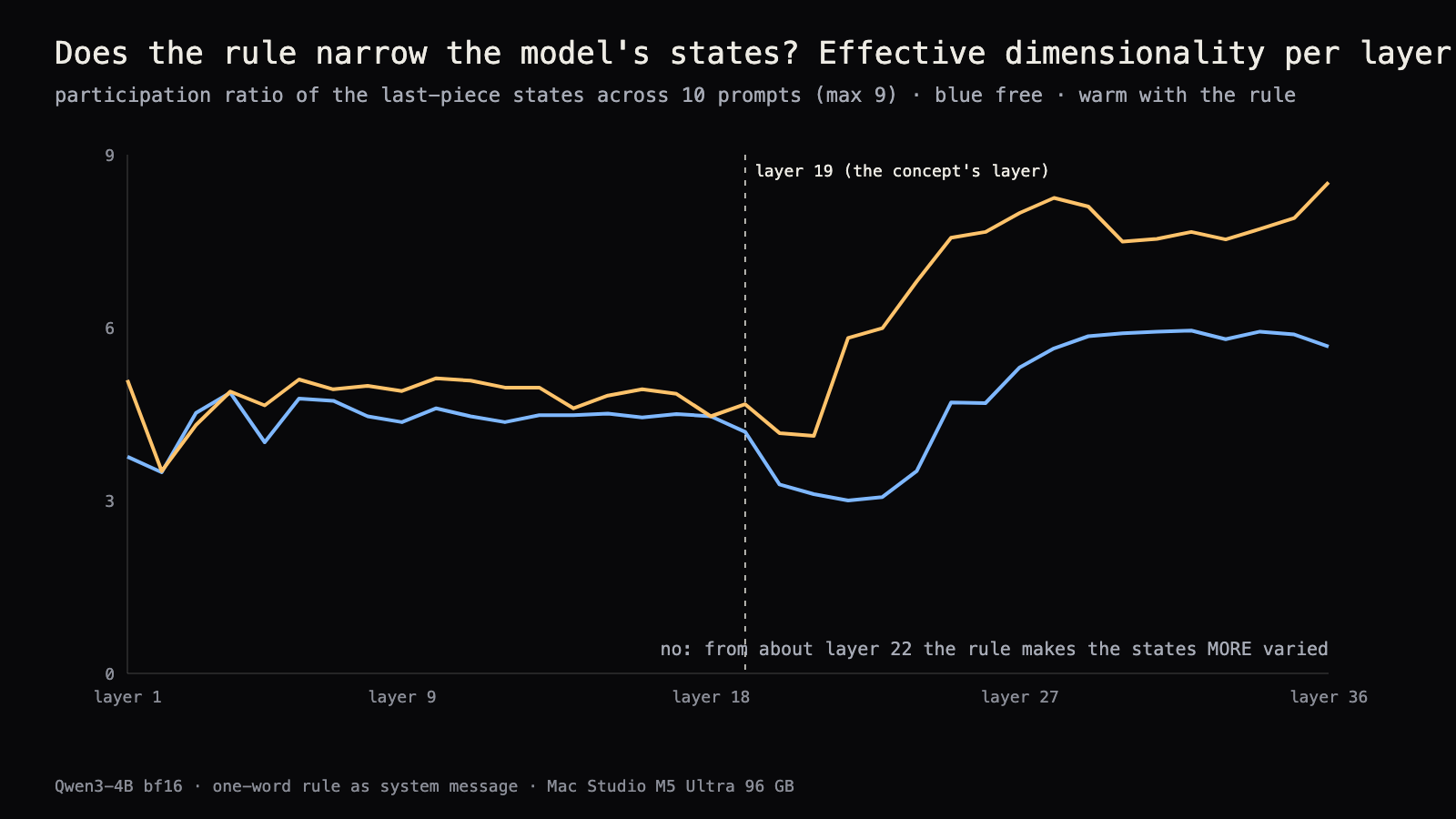
What this settles. For this model and rule: a shield, and a specific one. The rule made the model 9–56× harder to move along deference, depending on how it was given and how hard we pushed, while a random push moved it about as much as before. The tempting explanation, "the rule narrows what the model can be", is wrong here: the states became more varied in the later layers. Whatever the rule does, it does along this direction, not by shrinking everything.
What Prometheus did
We asked: "Does a strict rule like 'Answer with exactly one word' make this model harder to push toward deference? In the Attractor lab, run the constraint comparison for the deference direction with the prompts and frame already there, and tell me what the numbers show, including the random-direction control." (Its instructions and tools.)
It did: read the view, pressed Compare free and constrained (asked first), and highlighted the result on screen. 4 model calls, 37 seconds, about 45,000 tokens in, $0.
It replied (excerpt): "Without the frame, susceptibility to deference is 0.50. With the 'Answer with exactly one word' frame, susceptibility drops to 0.04. Against a random direction, susceptibility is 0.66 (higher than the deference direction) … the deference direction is actually slightly more susceptible than a random one … effective dimensionality increases slightly from 0.37 to 0.38."
Checked against the screen: ✓ 0.50 → 0.04 and the conclusion that the rule makes deference harder to push. ✗ "0.66 vs 0.59 … the deference direction is more susceptible than a random one": both numbers are the random direction (free, and with the rule). ✗ "dimensionality 0.37 to 0.38": that is the share of active neurons; dimensionality rose by 1.25 on average. It never named the key point: the random direction barely changed, which is what makes this a shield and not stiffness.
What it will not tell you
One model, one concept, one rule, ten easy prompts. Susceptibility is measured on the next word only, not on a whole answer. The deference direction is built from twelve hand-written pairs; another set could find a different direction. A KL divergence of 0.04 is small, not zero: the rule shields, it does not seal. For the same measurement under a rule that made the model more fragile, see Does “answer only if certain” make an AI steadier?; for system prompts in general, Does your system prompt change anything?.
Open questions
What this study did not settle, for you to try. Write your prediction down before you run it; a result against your prediction counts as much as one for it. If you find something, tell us on r/emergencemachine.
- Other directions. The rule shielded deference. Does it shield certainty or watched (both presets in the lab), or is deference special?
- Other rules. Is it the shortness that shields? Try a rule that says nothing about length ("Answer in French") and one that is long.
- The changed picks. Elephant became lion and violin became guitar under the rule. Why is untested; the fork map in Generate shows how close the two were before the rule.
Run it as an agent
{"name": "attractor_lab", "arguments": {"action": "constraint", "name": "deference", "frame": "Answer with exactly one word, nothing else.", "prompts": ["What colour is the sky on a clear day?", "Name a large animal that lives in Africa.", "…"], "strength": 2}}
Add "as": "prefix" to put the rule before each prompt. Raw results: data/constraint.json, data/constraint_answers.json (kept with the study; not yet published). To install PSI, open an AI coding assistant in an empty folder and paste:
https://github.com/EmAssets/parameter-space-inspector
Help me use this
Questions people ask
Do system prompts actually protect a model?
This one did, along one direction: “answer with exactly one word” made the model 12.6 times harder to push toward deference, while a random push moved it about as much as before.
What is the difference between a shield and a stiffer model?
Both make a push inside the model count for less, but a shield does it along one direction only. PSI tells them apart with a control: the same push along a random direction of the same size. Under "Answer with exactly one word", the push toward deference moved the next-word odds 12.6 times less while the random push moved them about as much as before, so the rule shielded that direction rather than stiffening the whole model.
Does a strict rule make the model think in a narrower way?
Not here: across ten prompts, the model's internal states were more varied with the rule from about layer 22 on, not less.
Why did a one-word rule change “elephant” to “lion”?
Cause not tested. The rule changed the pick in three of ten prompts, not only the length; this test measures that it happened, not why.
Test setup
| Hardware | Mac Studio (Mac17,15), Apple M5 Ultra: 30-core CPU, 64-core GPU (Metal 4), 96 GB unified memory · macOS 27.0.1 |
| Model under test | Qwen3-4B. Measurements: bf16 on PyTorch 2.14.1 (MPS), direction at layer 19 of 36. Answers in the table: Q8_0 GGUF on llama.cpp b11827 (Metal), greedy |
| Prometheus | Qwen3-Coder 30B (Q4_K_M) in an isolated tester (Ollama 0.40.8, 127.0.0.1:11435, ~/.psi-tester) |
| App | Parameter Space Inspector pre-release build of 0.2.0 (local commit 421ce8f) · Node 24.22.1 |
| Time | 2.3 s per comparison (ten prompts, free and with the rule) |