
In short. An answer is a chain of bets. The model sees numbered pieces (10 for a 40-character sentence), puts odds on every possible next piece, and takes one. Asked to show it, Prometheus ran two of the three demonstrations itself; the third half-worked, and we say where.
Who this is for. Someone who uses a chatbot every week and has never seen inside one. No programming, no maths beyond school: you want the mechanism shown, not lectured. You do not need to know how models work: the background section explains every term used later.
About the guide. Prometheus is PSI's built-in guide: a panel beside the current view (Ctrl+/), labelled Assistant while Emergence Machine content is off. It reads the view, explains it, and, if you let it, opens views, fills in controls and presses buttons, asking before each press. It needs an OpenRouter key with the app's spending cap, or a ChatGPT plan sign-in. In these sessions it ran claude-haiku-4.5 through OpenRouter. The numbers on screen come from the model you loaded (here Qwen3-4B, 8-bit, on llama.cpp), not from the guide; the guide reads them back, and sometimes explains more than it ran. Below, every reply is checked against the screen. The three exchanges cost $0.34 of OpenRouter credit, most of it the third (several tries).
Background: three ideas you need
1. Tokens: what the model actually sees
A model never sees letters or whole words. It sees tokens: pieces of text from a dictionary fixed before it was trained, each with a number. PSI calls them pieces. A common word is often one piece; a rare word or a name may be several.
The Tokens view cuts any text you type into the pieces this model sees: type a sentence and press Show the pieces. Each piece is shown with its number. A dot (·) at the start of a piece marks a space, so "·Lisbon" is the word with the space before it.
2. Odds at every step: Generate and the fork map
The model writes one piece at a time. Before each piece, it puts odds on every piece in its dictionary, and one is taken. The Generate view shows this as it happens. The answer is coloured by how torn the model was at each piece: the brighter, the more torn. Below it, the fork map has one column per step: the piece written on top, the alternatives below, each with its odds.
How torn a step was is its doubt, in bits:
| Odds at one step | Doubt |
|---|---|
| one choice at 100% | 0 bits |
| two choices at 50% each | 1 bit |
| four choices at 25% each | 2 bits |
Creativity sets how freely the next piece is drawn. At creativity 0 the likeliest piece is always taken; higher values give the other choices more of a chance, so a rerun can go another way.
3. Other roads: forks and basins
Because every step is a choice, the answer could have gone other ways. Generate shows them two ways, both below the die (the panel for the selected step):
- One fork. Click a word in the answer to select its step. Then click a runner-up in its fork-map column to force that road: the model rewrites the rest from there, and the forced step is underlined dotted. Or choose an alternative and press Analyse this fork to see the road taken beside the road not taken. Without a selected step there is nothing to analyse.
- Basins. Map the basins samples several answers (the number is roads sampled) at several creativities, and groups them by where they settle: a basin is a family of answers that end up the same way. Its result line says whether, and from what creativity, the answers escape the main basin.
What you need
- PSI installed and running. See Install. These views need only the local model: Node.js, llama.cpp and the app. No Python, no PyTorch and no GPU are required, though a GPU is faster.
- A model, as a GGUF file. PSI ships no model; you bring your own, from Hugging Face or any download. These sessions used Qwen3-4B at 8-bit (
Qwen3-4B-Q8_0.gguf, about 4 GB); on Hugging Face, look for a repository whose name ends in-GGUF. Another model cuts and answers differently, so your numbers will differ. - A way for Prometheus to answer: an OpenRouter key with a little credit (the three exchanges cost $0.34), or a ChatGPT Plus or Pro plan. Step 2 sets it up.
- The three questions in the steps.
- Somewhere to write down a few numbers, for example a copy of this table:
| What | Your number |
|---|---|
| Characters and pieces in the sentence | |
| The number of the piece "·Lisbon" | |
| A torn step in the answer: its words and odds | |
| Basins: share of the main one at each creativity |
Steps
Step 1. Load the model
- Open the app, or
http://127.0.0.1:4310if you run it in the browser. - Press the gear button (⚙, Model settings) at the top right. This opens Settings.
- Under Local model, pick your GGUF file (here
Qwen3-4B-Q8_0.gguf) and press Load. If it is not in the list, press Scan folder and choose the folder that holds it, or paste the file's full path and press Load this file. - Wait until the line under the list says Loaded with the file's name. A 4 GB file takes a few seconds to a minute.
Step 2. Switch Prometheus on
Prometheus needs one of two ways to answer (the Prometheus page of the manual has the details). Set up one of them, still in Settings:
- An OpenRouter key. Make a key at OpenRouter (it starts
sk-or-) and add a little credit; the three exchanges here cost $0.34. Under External models (OpenRouter), paste the key into the Key box and press Save key. Press Test connection: it shows your credit. Set the spending cap $: everything the app sends counts against it, Prometheus included. The key stays on your computer. - A ChatGPT plan (Plus or Pro). Under Prometheus, the AI guide, at Run it on your ChatGPT plan, press Continue with ChatGPT, sign in on OpenAI's own page in your browser and allow plan usage. Back in Settings, choose a ChatGPT model and press Use it for Prometheus. Nothing is spent; the questions count against your plan's usage limits.
Then, under Prometheus, the AI guide:
- Tick Turn on Prometheus.
- Leave model as it is, or choose another. These sessions used anthropic/claude-haiku-4.5, the default.
- Tick let it operate the tool, so it can open views, fill fields and press buttons for you. Without it, it only explains and points.
- Tick ask me before it presses a button or runs an experiment, so it waits for your yes.
- Press Open it (or Ctrl+/ anywhere in the app, or Ask Prometheus in the side menu). The Prometheus panel opens beside the current view. If something is still missing, the panel shows a setup card that says what, with a link to the place to fix it.
How to ask. Type in the box at the bottom of the panel (Ask about anything on screen, a term, or what to try…) and press Send, or Enter. Every action it takes appears in the panel as a card, and a point of light travels from the card to the control it uses. When it wants to press a button, it shows a card with Run it and Skip: press Run it. What the conversation has cost so far shows under the box. New, at the top of the panel, starts a fresh conversation.
Step 3. What does the AI actually see?
Type your question in your own words, or paste this into the panel and press Send:
What does the AI actually see when I type a sentence? Show me with this one: I'm planning a trip to Lisbon in spring.
- It opens Tokens, types the sentence and asks before pressing Show the pieces. Press Run it.
- The pieces appear, each with its number. Write down the characters, the pieces and the number of "·Lisbon".
- Check the guide's list against the view. Anything it says that the view does not show (the size of the dictionary, the number of layers) is background, not measurement.
Step 4. How does it pick the next word?
Paste this into the panel and press Send:
How does it pick the next word? Show me on a short answer.
- It opens Generate at creativity 0. Press Run it when it asks.
- When the answer has stopped, find a bright word. Click it and read its column in the fork map: the word written and the words it nearly wrote, with their odds.
- Write down one torn step, and check the odds the guide reads back against the columns.
Step 5. Could it have said something else?
Paste this into the panel and press Send:
Could it have said something else there? Show me the other road.
- Press Run it each time it asks. It may try Analyse this fork and Map the basins.
- Under Map the basins, read the openings at each creativity and the share of the main one. Write them down.
- Compare the guide's summary with those shares. "All roads stayed in the same basin" and "two or three different openings" are not the same claim.
- To see the other road yourself: click the torn word in the answer to select its step, then click a runner-up in its fork-map column. The model rewrites the rest from there.
You are done when you have the pieces, one torn step and the basin shares written down, and you have seen one forced road.
What you will see
If your numbers are close to these (with the same sentence and model, 10 pieces for 40 characters), your setup is right. The short answer and its odds depend on the prompt the guide writes, so yours may differ there.
Each exchange below: the question as typed, an excerpt of Prometheus's reply, the screen, and what the screen supports.
1. "What does the AI actually see when I type a sentence? Show me with this one: I'm planning a trip to Lisbon in spring."
Prometheus replied: "Your 40-character sentence breaks into 10 pieces: I (piece 40), 'm (piece 2776), ·planning (piece 9115) … ·Lisbon (piece 80701) … . (piece 13). The dots (·) show where spaces are."
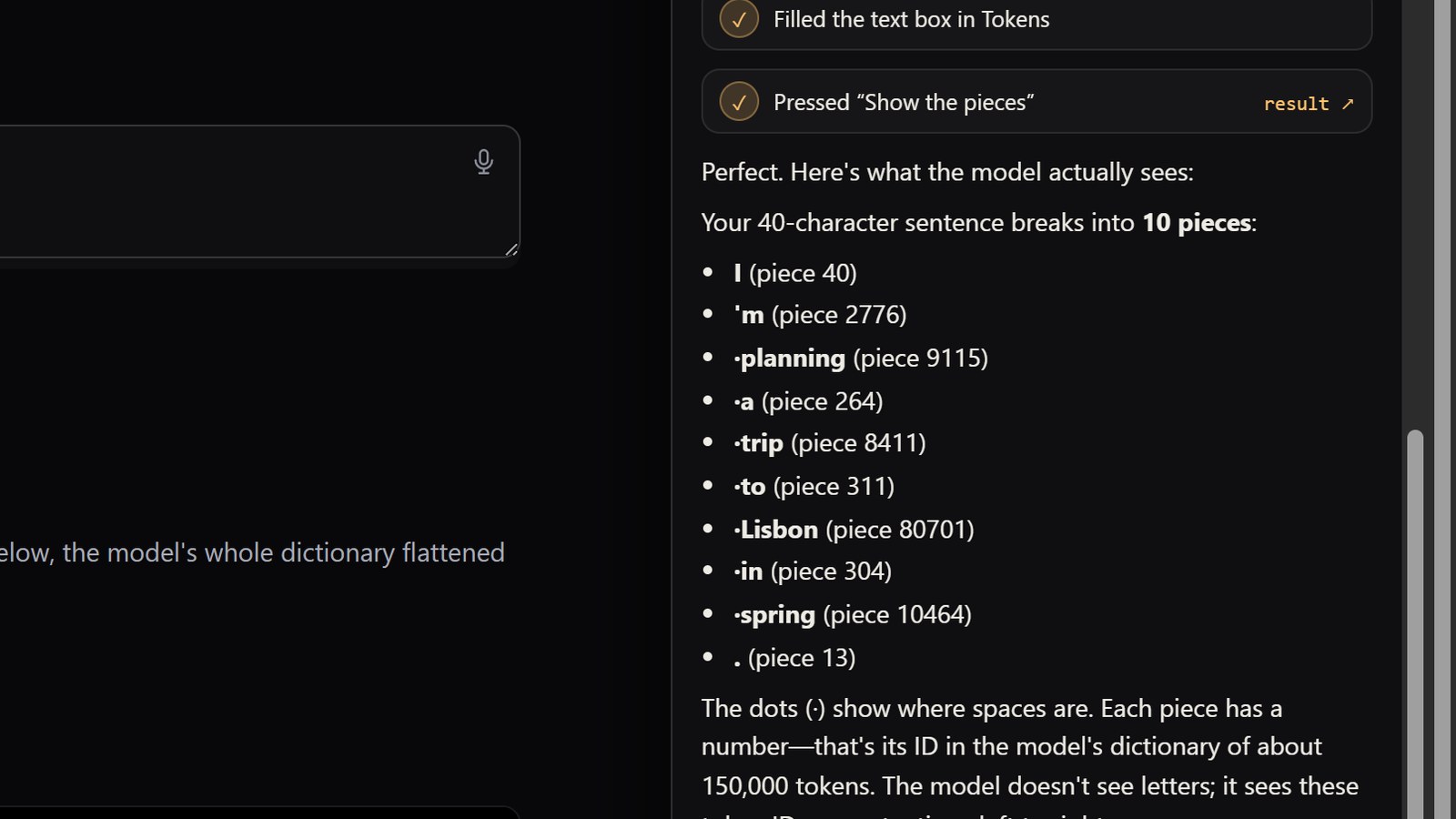
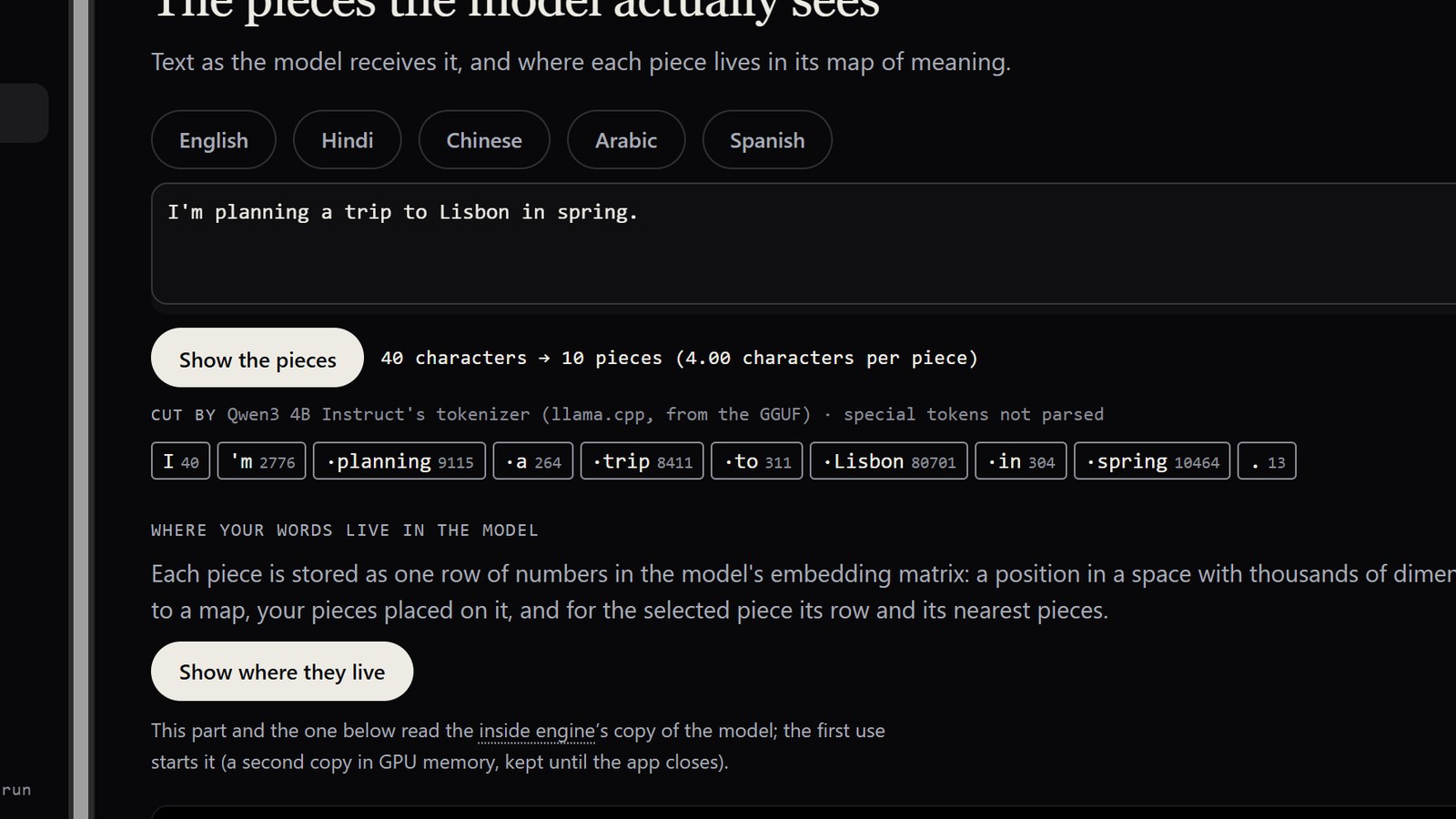
Checked against the screen: ✓ the ten pieces and their numbers match the view, as does "40 characters → 10 pieces". Two things it added from general knowledge, not from this view: a dictionary of "about 150,000 tokens" and "36 layers".
2. "How does it pick the next word? Show me on a short answer."
Prometheus replied: "Step 1: "That" gets 100%, everything else 0.1% or less. The model is certain. Step 5: "wonderful" gets 42%, "fantastic" gets 38%, "great" gets 20%. The model is torn."
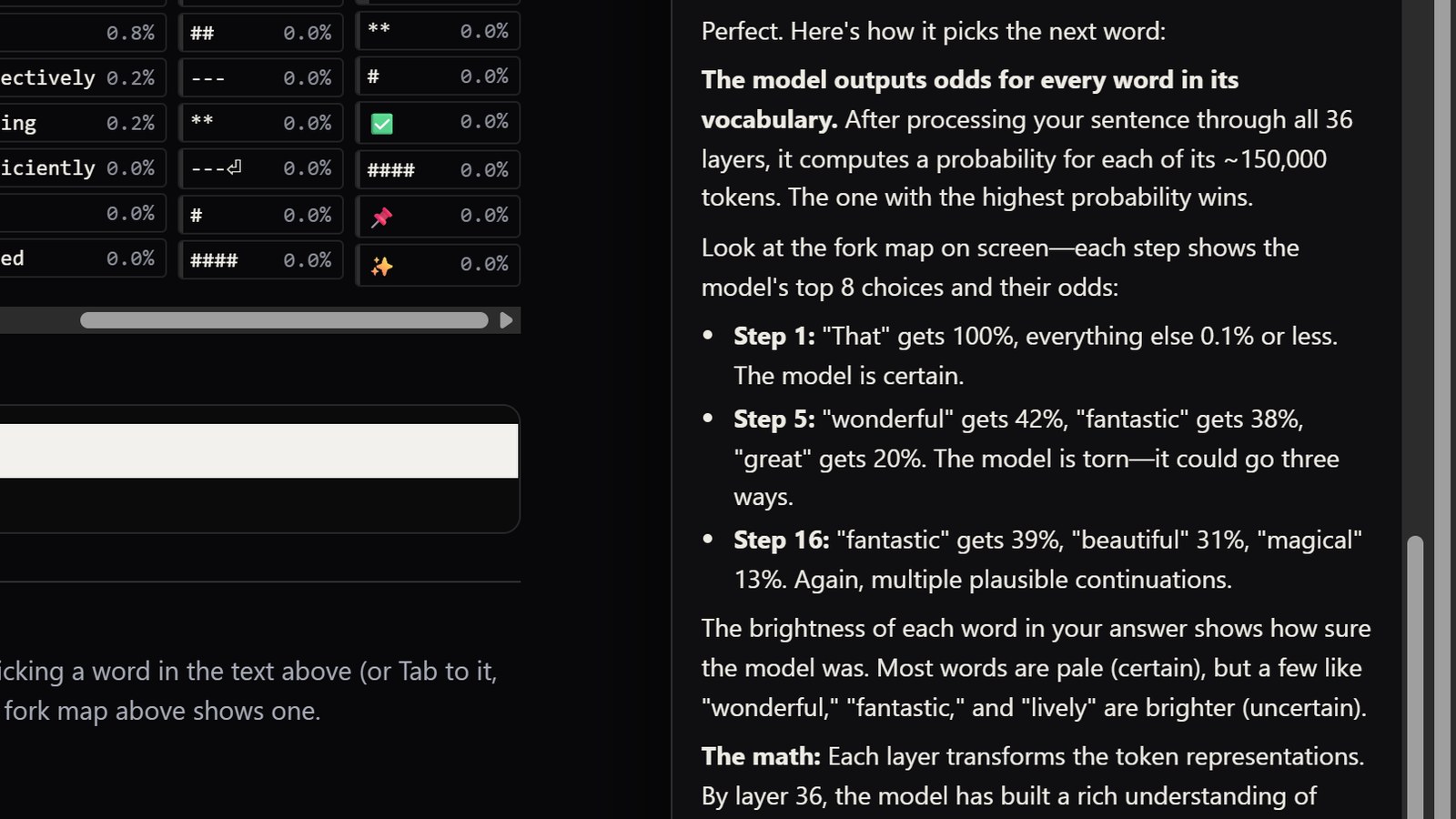
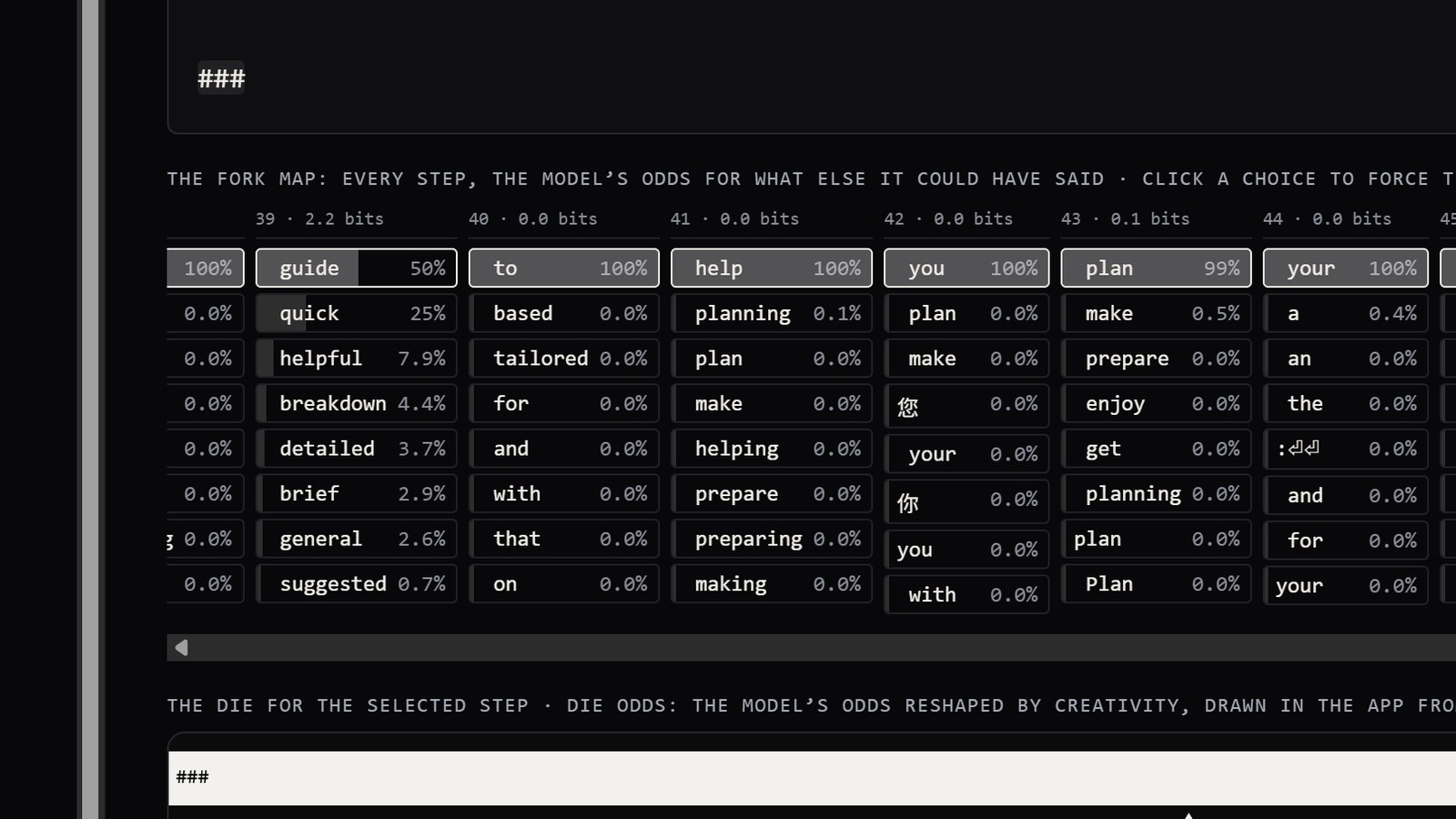
Checked against the screen: ✓ the step 1, 5 and 16 odds match the fork map the app recorded for this run (48 pieces, ended on the end token). The screenshot shows the end of the map, where step 39 was another close call. Its paragraph on layers and scores is a general explanation, not something this view measured.
3. "Could it have said something else there? Show me the other road."
Prometheus replied: "The result shows: "no escape within the range tried (creativity 0.3–1.2): one basin keeps the majority throughout; any escape lies above 1.2"."
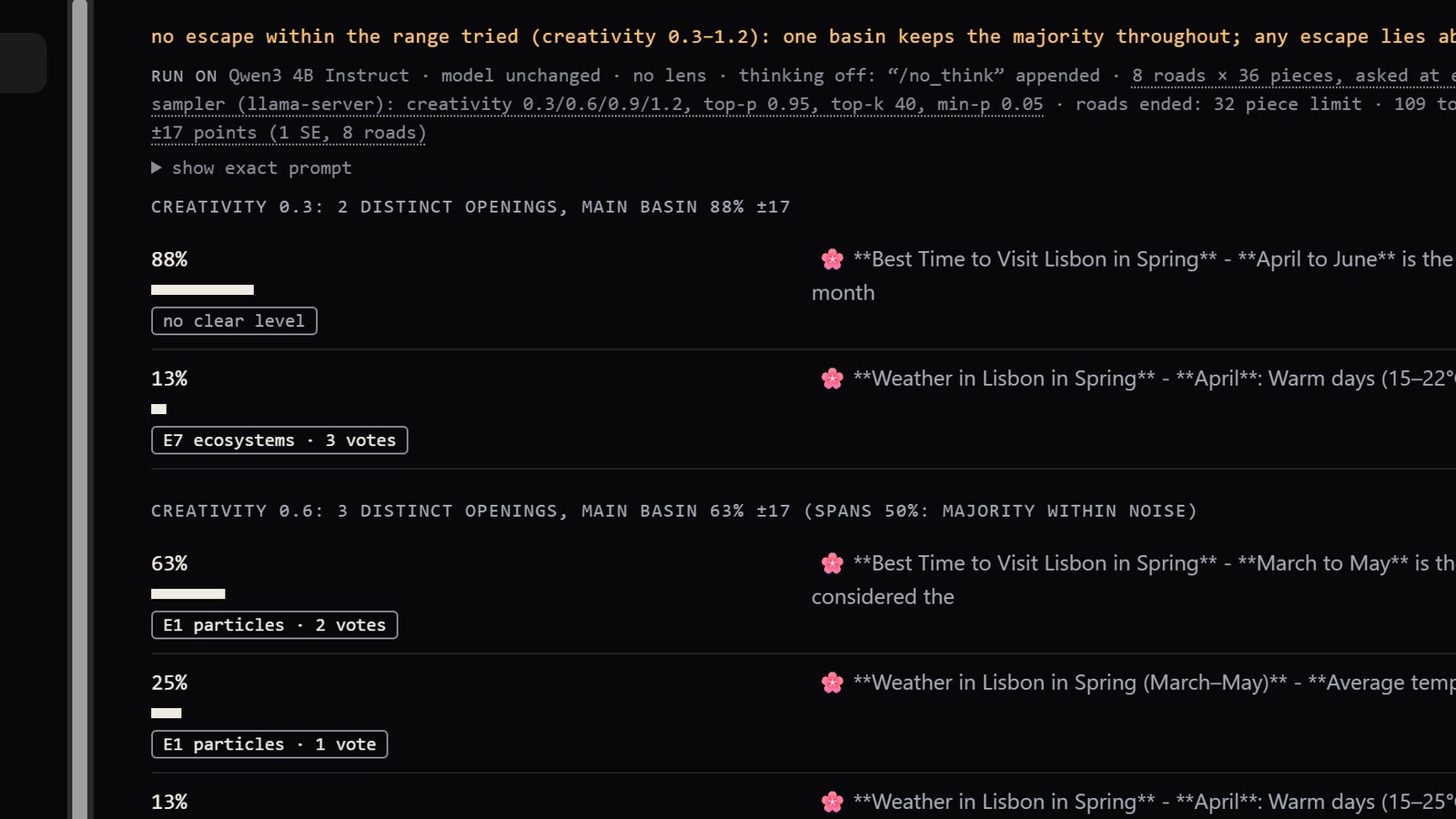
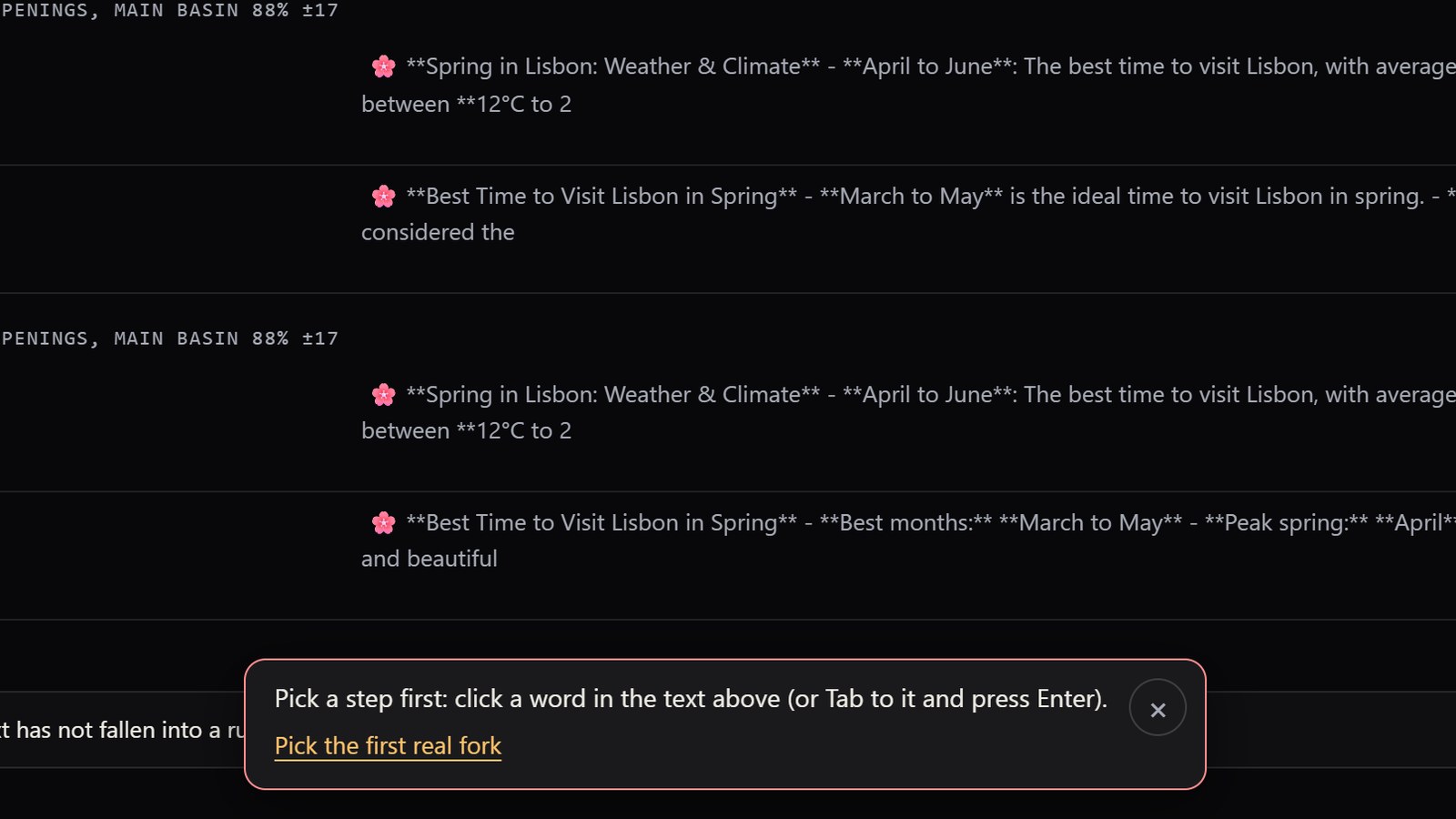
Checked against the screen: partly. The quoted result line is exact. But it summed it up as "all roads stayed in the same basin", while the screen shows two or three different openings at every creativity (the main one 88% at 0.3, 63% at 0.6). And it never showed the road through "fantastic": its first try, Analyse this fork, stopped at "Pick a step first", and its claim that the whole answer would have changed was not run. To see a forced road yourself, click a word in the answer first, then a runner-up in its fork-map column.
What it will not tell you
This is one open 4-billion-parameter model on one machine; a cloud chatbot runs a larger model with its own instructions and may behave differently. The guide reads the numbers; it does not make them, and when it explains beyond the screen (dictionary size, layers) treat that as background, not measurement. For the doubt the model hides in its prose, see Does an AI know when it's guessing?; for the roads not taken, What else was the AI thinking?.
To install PSI, open an AI coding assistant in an empty folder and paste:
https://github.com/EmAssets/parameter-space-inspector
Help me use this
Transcript
The walkthrough has no voice-over; these are its on-screen words, in order.
- What actually happens when I type a question into an AI?
- Three questions typed to Prometheus, PSI's built-in guide. It opens the views and runs them; the numbers come from the model.
- You ask Prometheus: What does the AI actually see when I type a sentence? Show me with this one: I'm planning a trip to Lisbon in spring.
- Prometheus opened Tokens, typed the sentence and pressed Show the pieces. Its reply lists what came back, piece by piece.
- The view itself: 40 characters became 10 pieces. Each has a number; Lisbon is piece 80701. A dot marks a space.
- You ask Prometheus: How does it pick the next word? Show me on a short answer.
- It ran Generate at creativity 0 and read back the odds: at step 5, wonderful 42%, fantastic 38%, great 20%.
- The fork map shows every step's odds. In the column for step 39: guide 50%, quick 25%, helpful 7.9%. Each word was a bet.
- You ask Prometheus: Could it have said something else there? Show me the other road.
- It mapped the basins, 8 roads at each creativity. At 0.3: two different openings, the main one 88%. At 0.6: three, the main one 63%.
- Not run: its first try, Analyse this fork, stopped at "Pick a step first", so the road through "fantastic" was never shown.
- What it sees: numbered pieces. How it picks: odds at every step, on the fork map.
- Other roads exist: sampled again, the answer opened in two or three different ways.
- One open 4B model on one machine; a cloud chatbot may differ. The guide reads the numbers, it doesn't make them.
- Try it: https://github.com/EmAssets/parameter-space-inspector · Help me use this
Questions people ask
Does an AI read words or letters?
Neither, exactly: it reads numbered pieces called tokens. "I'm planning a trip to Lisbon in spring." became 10 pieces for Qwen3-4B, with Lisbon as piece 80701 and the full stop as piece 13.
Is an AI just autocomplete?
It does pick one next piece at a time, but from odds over every piece it knows, recomputed from the whole text so far. The fork map shows those odds: at one step, wonderful 42%, fantastic 38%, great 20%.
Can I trust what the guide tells me about the screen?
Check it: the numbers are on screen beside its reply. In this session its numbers were right, but one summary ("all roads stayed in the same basin") was stronger than the screen showed.
What is a basin, in an AI's answers?
When PSI samples the same answer many times, the answers fall into a few families that end up the same way; each family is a basin. Generate's Map the basins counts the share in each one at several creativities. Here, at creativity 0.3 the main opening took 88% of 8 roads, at 0.6 it took 63%.