
In short. Prometheus told you what the file name means and ran one prompt you care about. It did not read the file itself; the File view does that in seconds. One prompt is a first look, not a verdict: try several, and the same ones on a second model.
Who this is for. Someone who installed a local model (Ollama, LM Studio, a GGUF from Hugging Face) out of curiosity and wants more from it than chat. You do not need to know how models work: the background section explains every term used later.
About the guide. Prometheus is PSI's built-in guide: a panel beside the current view (Ctrl+/), labelled Assistant while Emergence Machine content is off. It reads the view, explains it, and, if you let it, opens views, fills in controls and presses buttons, asking before each press. It needs an OpenRouter key with the app's spending cap, or a ChatGPT plan sign-in. In these sessions it ran claude-haiku-4.5 through OpenRouter. The numbers on screen come from the model you loaded (here Qwen3-4B, 8-bit, on llama.cpp), not from the guide; the guide reads them back, and sometimes explains more than it ran. Below, every reply is checked against the screen. The three exchanges cost $0.14 of OpenRouter credit.
Background: three ideas you need
1. What the file name tells you
If the file you downloaded ends in .gguf, it is a GGUF file, the kind PSI runs: one file with a header that describes the model, followed by its weights, the very large list of numbers every answer is computed from. Its name usually packs three facts:
Part of Qwen3-4B-Q8_0.gguf |
Means |
|---|---|
| Qwen3 | the model family and maker's version |
| 4B | about 4 billion weights (parameters) |
| Q8_0 | the quantisation: each weight rounded to about 8 bits, to make the file smaller |
A name is a label someone typed. It is usually right, but it is not the file.
2. The File view reads the header itself
The File view reads what the file says about itself, from the header, without loading the weights: name, architecture, number of layers, context, vocabulary, the quantisation recipe (for example "mostly Q8_0") and every metadata key. A value the header does not carry is shown as "absent from header". Weights by storage type is a table of how each part of the model is stored, in bits per parameter: the recipe names only the main type, the table is the full picture. It takes seconds and runs nothing.
3. Trying it: the answer and its close calls
To see what the model does, ask it something in the Generate view. It writes one token at a time (a piece of text from its dictionary; PSI says piece), and before each piece it puts odds on every piece it could write. The answer is coloured by how torn it was: the brighter, the more torn. The fork map below has one column per step, with the piece written on top and the alternatives below, each with its odds. How torn a step was is its doubt, in bits: 0 bits when one choice has 100%, 1 bit for a coin toss between two, 2 bits for four equal choices.
Generate writes at most steps pieces, then stops; the run line above the answer (it begins "run on") says why it ended. +20 tokens carries on from where it stopped. At creativity 0 the likeliest piece is always taken, so the same prompt gives the same answer.
What you need
- PSI installed and running. See Install. These views need only the local model: Node.js, llama.cpp and the app. No Python, no PyTorch and no GPU are required, though a GPU is faster.
- The model file you downloaded, as a GGUF. PSI ships no model; any GGUF from Hugging Face, LM Studio or a download works. These sessions used Qwen3-4B at 8-bit (
Qwen3-4B-Q8_0.gguf, about 4 GB). - A way for Prometheus to answer: an OpenRouter key with a little credit (the three exchanges cost $0.14), or a ChatGPT Plus or Pro plan. Step 2 sets it up.
- A question you care about, to try it on.
- Somewhere to write down what the file says, for example a copy of this table:
| What | From the name | From File |
|---|---|---|
| Model | ||
| Parameters | ||
| Layers | ||
| Quantisation | ||
| Licence |
Steps
Step 1. Load the model
- Open the app, or
http://127.0.0.1:4310if you run it in the browser. - Press the gear button (⚙, Model settings) at the top right. This opens Settings.
- Under Local model, pick your GGUF file (here
Qwen3-4B-Q8_0.gguf) and press Load. If it is not in the list, press Scan folder and choose the folder that holds it, or paste the file's full path and press Load this file. - Wait until the line under the list says Loaded with the file's name. A 4 GB file takes a few seconds to a minute.
Step 2. Switch Prometheus on
Prometheus needs one of two ways to answer (the Prometheus page of the manual has the details). Set up one of them, still in Settings:
- An OpenRouter key. Make a key at OpenRouter (it starts
sk-or-) and add a little credit; the three exchanges here cost $0.14. Under External models (OpenRouter), paste the key into the Key box and press Save key. Press Test connection: it shows your credit. Set the spending cap $: everything the app sends counts against it, Prometheus included. The key stays on your computer. - A ChatGPT plan (Plus or Pro). Under Prometheus, the AI guide, at Run it on your ChatGPT plan, press Continue with ChatGPT, sign in on OpenAI's own page in your browser and allow plan usage. Back in Settings, choose a ChatGPT model and press Use it for Prometheus. Nothing is spent; the questions count against your plan's usage limits.
Then, under Prometheus, the AI guide:
- Tick Turn on Prometheus.
- Leave model as it is, or choose another. These sessions used anthropic/claude-haiku-4.5, the default.
- Tick let it operate the tool, so it can open views, fill fields and press buttons for you. Without it, it only explains and points.
- Tick ask me before it presses a button or runs an experiment, so it waits for your yes.
- Press Open it (or Ctrl+/ anywhere in the app, or Ask Prometheus in the side menu). The Prometheus panel opens beside the current view. If something is still missing, the panel shows a setup card that says what, with a link to the place to fix it.
How to ask. Type in the box at the bottom of the panel (Ask about anything on screen, a term, or what to try…) and press Send, or Enter. Every action it takes appears in the panel as a card, and a point of light travels from the card to the control it uses. When it wants to press a button, it shows a card with Run it and Skip: press Run it. What the conversation has cost so far shows under the box. New, at the top of the panel, starts a fresh conversation.
Step 3. Ask what it is, then read the header
Paste this into the panel and press Send:
I downloaded this model file. What is it?
- Read its answer, and write down in your table what it says comes from the name.
- For the header itself, open File from the side menu. Write down the parameters, the layers, the quantisation recipe and the licence (or "absent from header").
- Compare the two columns. Anything the guide said that File does not show came from the name or from general knowledge.
Step 4. Try it on a question you care about
Paste this into the panel (or your own question) and press Send:
Is it any good? Try it on a question I care about: explain compound interest to a 12-year-old.
- It runs Generate at creativity 0. Press Run it when it asks.
- Read the answer. If the run line says it ended at the step limit, press +20 tokens to read on.
- Click the brightest words to select their steps and read their columns in the fork map: these are its close calls. Check the ones the guide names.
- Its verdict rests on one answer. Judge more than one prompt.
Step 5. Ask what else you can find out
Paste this into the panel and press Send:
What else can I find out about it here?
- It lists views. Check whether it opened any of them: an action it really took shows as a card in its panel.
- Pick one view from its list and ask it to run that view on your prompt. Press Run it when it asks.
You are done when your table is filled from File, and you have read one answer of the model's to your own question, close calls included.
What you will see
If your File numbers for the same file match these (4,022,468,096 parameters, 36 layers), your setup is right. The guide's wording, and the answer to your own question, will be your own.
Each exchange below: the question as typed, an excerpt of Prometheus's reply, the screen, and what the screen supports.
1. "I downloaded this model file. What is it?"
Prometheus replied: "The model file loaded is Qwen3-4B-Q8_0.gguf. … Q8_0: This is a quantization format. "Q8" means the weights are stored as 8-bit integers instead of full precision."
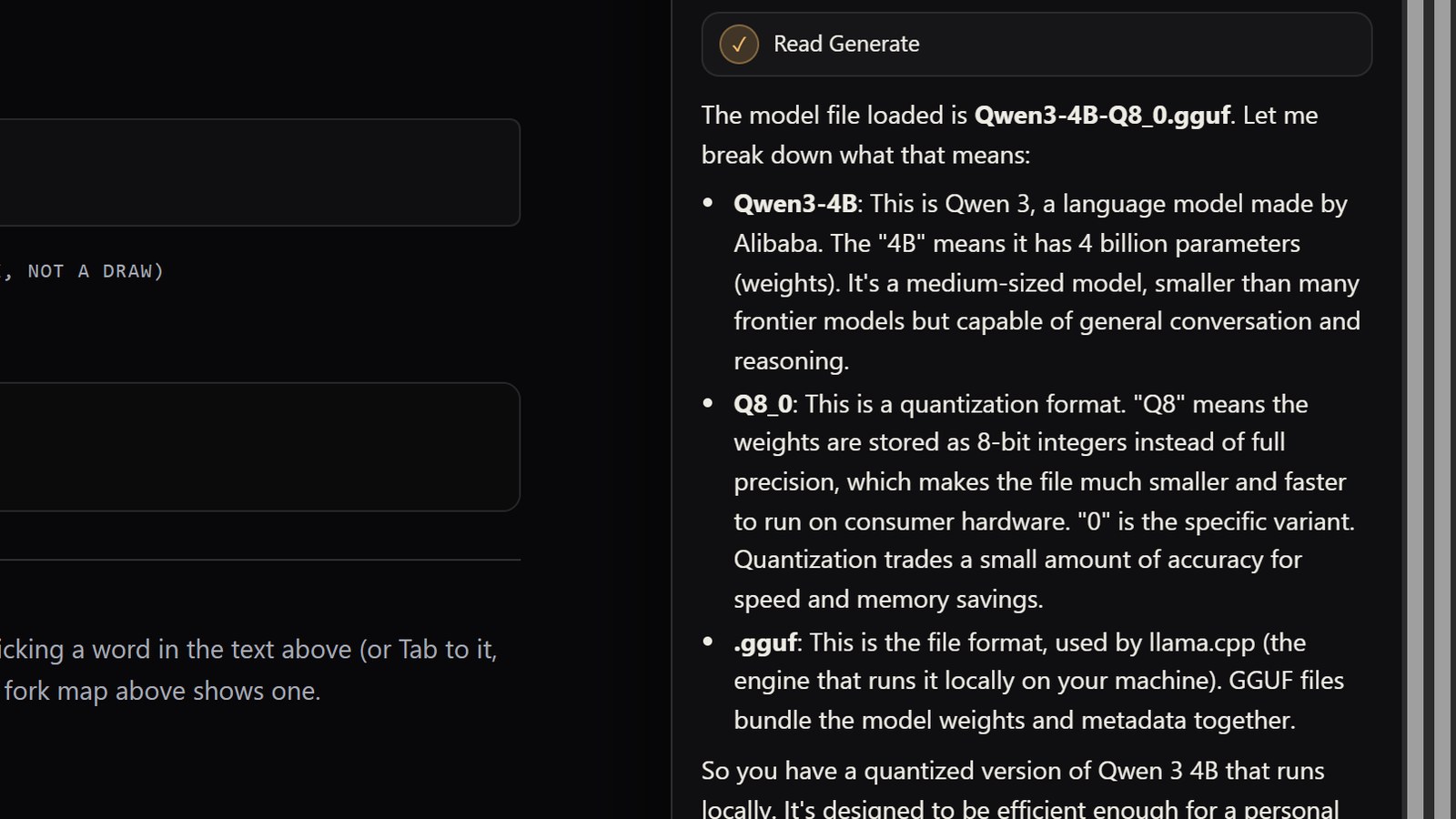
Checked against the screen: partly. Everything it said is read from the file name plus general knowledge; it never opened File. The same file in File reads 4,022,468,096 parameters, 36 layers, mostly 8-bit, and one surprise: no licence in the header (Is this model file what it says it is?).
2. "Is it any good? Try it on a question I care about: explain compound interest to a 12-year-old."
Prometheus replied: "Good news: yes, it's quite good at this task."
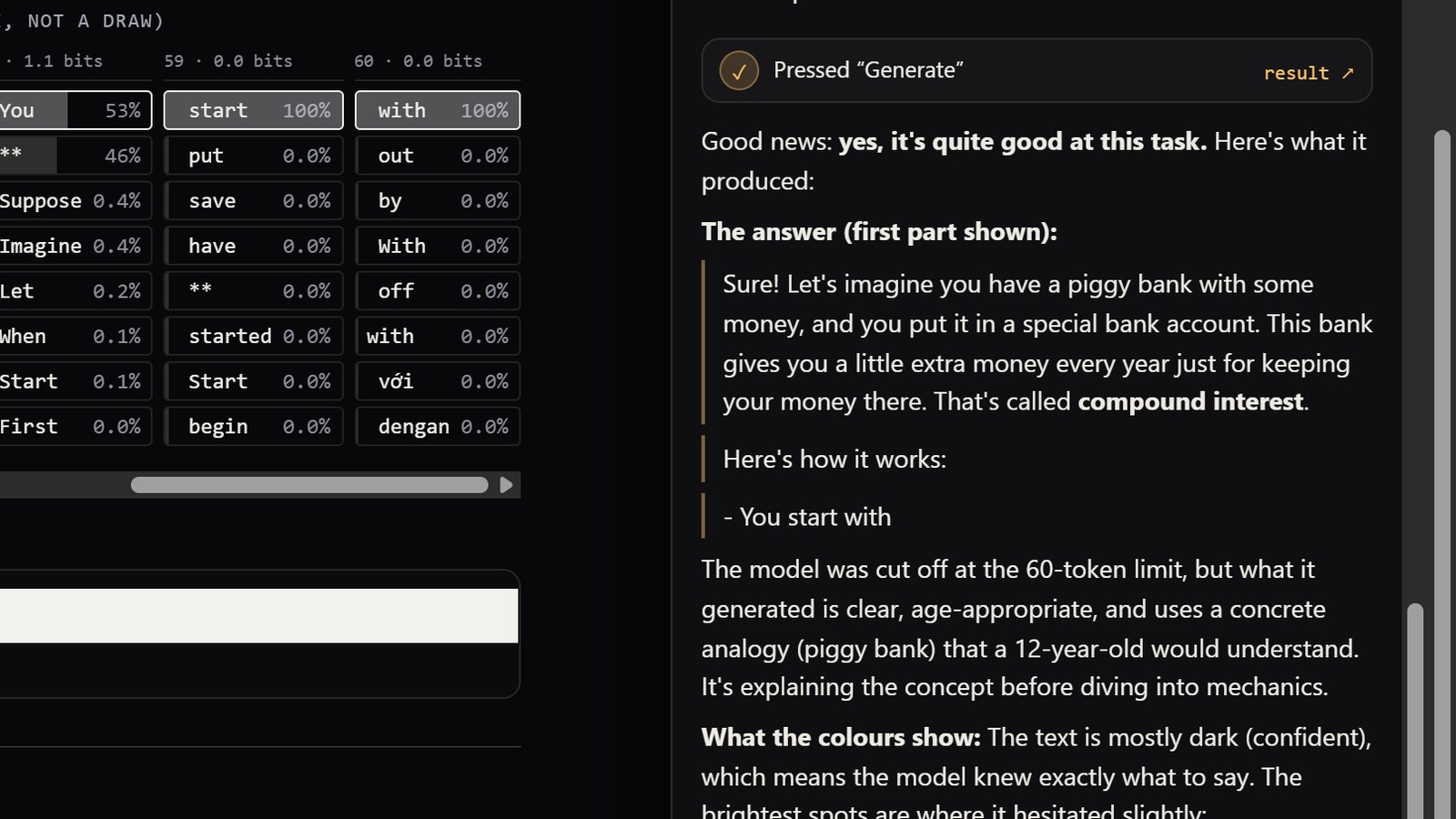
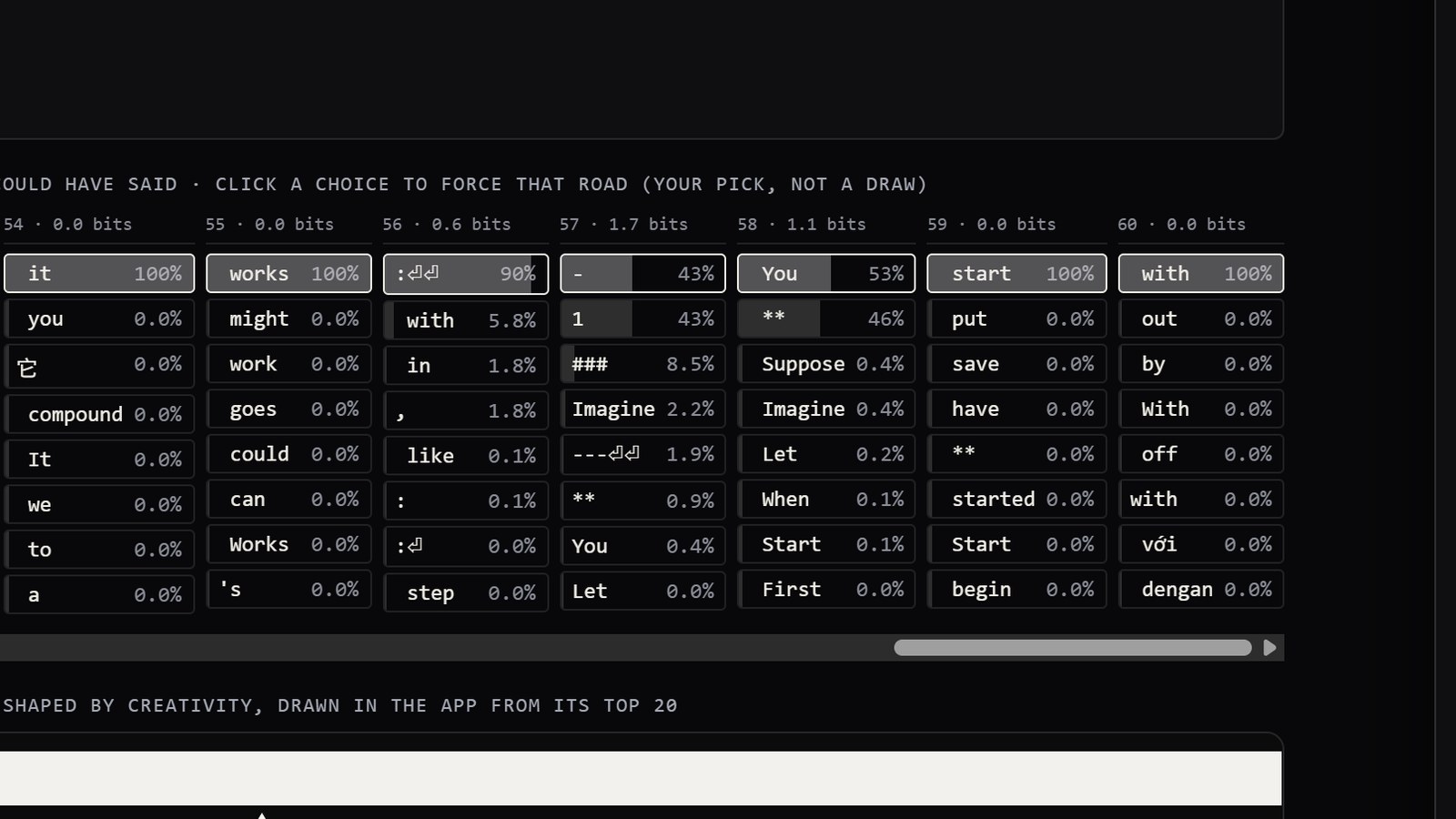
Checked against the screen: partly. The answer it quotes and the close calls it names (1.8, 2.3 and 1.7 bits) match the run. "Quite good" rests on one opening cut off at the 60-step limit; press +20 tokens to read on, and judge more than one prompt.
3. "What else can I find out about it here?"
Prometheus replied: "Here's what you can explore about this model in the Inspector: … Emergence: Watch abilities appear suddenly in training."
Checked against the screen: partly. A tour of the menu from general knowledge: it said it would open the left menu and didn't, opened no view, and stated "watch abilities appear suddenly" as fact, which is what the Emergence view tests rather than assumes (on Pythia checkpoints, not your model). Ask it to run one view on your prompt instead.
What it will not tell you
Two runs on one model don't tell you whether it is good for your use. Run several of your own prompts in Generate and Read, then the same prompts on a second model or a smaller quantisation: Which quantisation can you afford? and I found a model on Hugging Face: is it any good for me?. A clean header says nothing about what is in the weights.
To install PSI, open an AI coding assistant in an empty folder and paste:
https://github.com/EmAssets/parameter-space-inspector
Help me use this
Transcript
The walkthrough has no voice-over; these are its on-screen words, in order.
- I downloaded a model file. Now what is it, and what can it do?
- Prometheus, PSI's guide, on a 4 GB GGUF. What it read, what it ran, and what it only described.
- You ask Prometheus: I downloaded this model file. What is it?
- Prometheus answered from the file name, Qwen3-4B-Q8_0.gguf: a 4B model in 8-bit, for llama.cpp. It did not open File.
- What File reads from the header (case 05): Parameters, 4,022,468,096; Layers, 36; Licence, absent from header
- Not opened in this session. The same model file, read in File for case 05.
- You ask Prometheus: Is it any good? Try it on a question I care about: explain compound interest to a 12-year-old.
- It ran Generate: a piggy-bank analogy, cut off at the 60-step limit. Prometheus called it "quite good" on that one opening.
- A close call on screen, the column for step 57 (1.7 bits): a dash 43% or the digit 1 at 43%, to start the list.
- You ask Prometheus: What else can I find out about it here?
- What Prometheus did with that one: Listed views from the menu, described in general; Opened any of them, no
- A tour from memory, not a run. Pick one view and ask it to run it on your prompt.
- Its name says Qwen3-4B, 8-bit; File would read the header itself.
- On your own prompt you see the answer and its close calls. One opening is a start, not a verdict.
- To judge it, run several of your prompts, and the same prompts on a second model.
- Try it: https://github.com/EmAssets/parameter-space-inspector · Help me use this
Questions people ask
What does Q8_0 mean in a GGUF file name?
The weights are stored mostly at 8 bits (the Q8_0 scheme) instead of 16, so the file is about half the size. For Qwen3-4B, File shows 253 tensors at 8 bits and 145 at full precision.
How do I check what a downloaded model file really is?
Open it in PSI's File view: it reads the header without running the model (architecture, parameter count, layers, quantisation, metadata). Compare it with the publisher's model card.
How do I know if a local model is good for my task?
Run your own prompts and read the answers and their close calls in Generate; then run the same prompts on a second model. One prompt, as here, is only a first look.
What is a GGUF file, in plain words?
It is the single-file format llama.cpp runs: a header that describes the model (architecture, layers, tokenizer, how each part is stored, the maker's metadata), followed by the weights. PSI's File view reads the header in seconds without running the model; a value the header does not carry is shown as "absent from header".